Learning how to check HRDF balance helps you see how much levy is available before planning employee training.
You can view the balance through the HRD Corp eTRiS portal and open the Levy Statement for a more detailed breakdown.
Checking it early helps you plan training with more control, avoid last-minute decisions and make better use of the levy your company has already contributed.
The steps below show exactly where to find the balance, what the figures mean and what to do next.
What Is the HRDF Levy Balance?
Your HRDF levy balance is the amount available in your company’s HRD Corp levy account after contributions and reimbursements are taken into account. Employers can use the levy through HRD Corp’s grant system to fund eligible employee training.
Under the Pembangunan Sumber Manusia Berhad Act 2001, employers with 10 or more Malaysian employees must register and contribute 1% of monthly wages. Employers with 5 to 9 Malaysian employees can register voluntarily and contribute 0.5%.
A company with RM100,000 in eligible monthly wages under the 1% category contributes RM1,000 a month, or RM12,000 a year, to its HRD Corp levy.
Employers can refer to the HRDF contribution in Malaysia requirements to calculate their monthly levy payments, check contribution rates and identify the types of employee training eligible for funding.
Contact My Team Plan to plan HRD Corp claimable training around your available levy balance and team goals.
How to Check HRDF Balance in eTRiS: 4 Steps
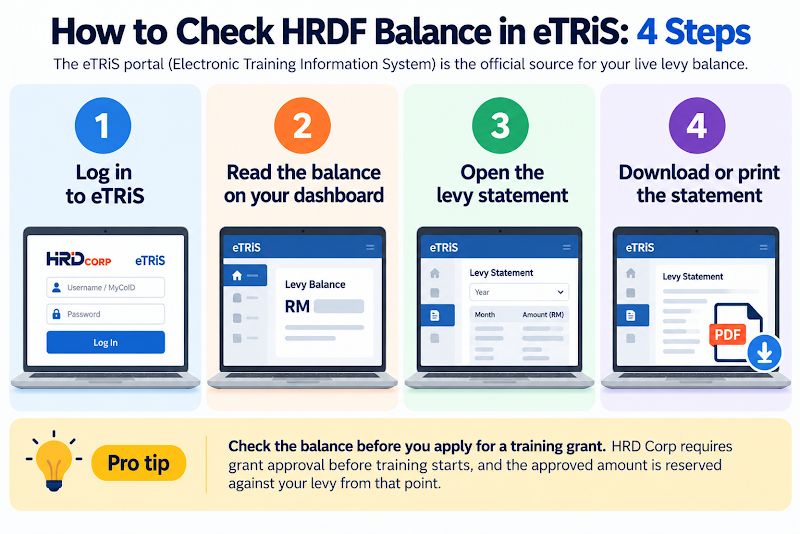
The eTRiS portal (Electronic Training Information System) is the official source for your live levy balance.
Step 1: Log In to eTRiS
Go to the HRD Corp eTRiS employer login page and enter your Username or MyCoID and password. HRD Corp emails these to the registered contact person after employer registration.
Step 2: Read the Balance on Your Dashboard
The employer dashboard displays your current levy balance on login. Note the date, since the figure changes whenever a payment posts or a grant is approved.
Step 3: Open the Levy Statement
Select the levy section in the menu to view the statement month by month, filtered by year.
Step 4: Download or Print the Statement
Export the statement as a PDF for finance records or your training plan meeting.
Pro tip: Check the balance before you apply for a training grant. HRD Corp requires grant approval before training starts, and the approved amount is reserved against your levy from that point.
How to Read Your HRD Corp Levy Statement
Your Levy Statement shows where every ringgit went.
| Statement figure | What it shows | What to check |
|---|---|---|
| Levy contributions | Monthly 1% or 0.5% payments received by HRD Corp | Every month appears, paid by the 15th |
| Grants approved | Amounts reserved for approved training programmes | Matches the programmes HR has booked |
| Claims paid | Reimbursements after training is completed | No claim left pending after documents are submitted |
| Available balance | Levy still free for new grant applications | The figure you plan next quarter’s training around |
A missing month usually points to a late payment.
HRD Corp may impose 10% annual interest on outstanding levy payments calculated based on the period of delay. Check with your finance team to confirm that all levy payments have been successfully credited.
What to Do With Your HRDF Balance
An available levy balance is budget waiting for a purpose, and HRD Corp funds soft skills and team development alongside technical courses.
| Team Challenge | Recommended Programme | Focus |
|---|---|---|
| Weak cross-department communication | Speak with Impact | Builds clearer communication and presentation skills |
| Low morale or newly merged teams | Bond to Win | Strengthens trust, collaboration and team connection |
How My Team Plan Turns Your Levy Into Stronger Teams
My Team Plan plans HRD Corp claimable programmes and supports the required documentation, making it easier for companies to use their levy for structured team training.
- HRD Corp Registered Training Provider: HRD Corp compliant modules give your claim the right structure from day one.
- Claim guidance from start to finish: clear direction on required documents and submission.
- Customised for your people: half-day to full-day formats across the Klang Valley.
- Proven track record: over 250 successful events and 8 years, with sessions led by Johnson Ling, a PSMB certified trainer.
Book 2 to 4 weeks ahead and receive a proposal within 24 hours. Explore My Team Plan’s HRDF claimable training programs.
Use Your HRD Corp Levy for Team Training
Checking your HRDF balance is only the first step.
My Team Plan helps companies turn available levy into HRD Corp-claimable team building, with programme planning and claim support backed by more than 250 successful events.
Book a consultation with My Team Plan today.
Frequently Asked Questions on How to Check HRDF Balance
1. Where can I see my HRD Corp levy balance?
Your levy balance appears in the eTRiS employer dashboard, and My Team Plan can guide your team through the Levy Statement before planning training.
2. How often should I check my HRD Corp levy balance?
Check it at least quarterly and before each grant application so My Team Plan can plan claimable programmes around the available balance.
3. Why is my HRD Corp levy balance lower than expected?
Approved grants that have not yet been claimed may reduce the available balance, so check existing training commitments before planning another My Team Plan programme.
4. What happens if a levy payment is missing from my balance?
Check the payment with your finance team and eTRiS first, as levy arrears may affect grant planning for your next My Team Plan programme.
5. Can I use my HRD Corp levy balance for team building?
Yes, eligible structured team building such as My Team Plan’s Bond to Win can be funded through your HRD Corp levy.
6. Who can help me plan how to use my remaining levy balance?
My Team Plan can match your available levy with suitable HRD Corp claimable team building and training programmes.